What's new?
A rundown of the latest features, improvements, and bug fixes.
What's New in Ovo Task 🚀
📊 Dashboard & Analytics
- "Unassigned" Tasks Insight: Added a new dedicated card to your dashboard that tracks tasks with no owners. Instantly see how many tasks need to be delegated so nothing slips through the cracks.
- High-Contrast Data Visualization: We've updated the colors for Task Progress and Status charts. The new palette is more vibrant and distinct, making it easier to read your data at a glance.
🗂️ Task Management & Navigation
- Enhanced 4-Column Layout: On larger screens, the Tasks view now displays 4 cards per row (up from 3). This denser layout lets you see more of your workload without scrolling.
- Visual Tree Hierarchy: The sidebar navigation now features a beautiful tree-view structure for your Task categories.
- Connector Lines: Vertical and horizontal lines clearly show the relationship between categories.
- Rounded Corners: Smooth, modern L-curves for a polished look.
- Dark Mode Support: Optimized visibility for seamless navigation in dark themes.
🛠️ Improvements & Fixes
- Persistent Custom Icons: Custom category icons now save and persist reliably. Your personalized workspace setup stays exactly how you left it, even after refreshing the page.
New Feature Update: Enhanced Group Chat Experience
New Feature Update: Enhanced Group Chat Experience
We've completely overhauled how you manage and interact with groups to make your team communication smoother and more organized.
🚀 Better Group Management
Take full control of your team's spaces with our new Group Details view.
- Easy Customization: Update your group name and upload a custom avatar to give your team a unique identity.
- Member Management: Easily view all members in a group. Admins can now add new colleagues or remove members directly from the group settings.
- Smart Permissions: Group creators maintain control, ensuring your important channels are always managed safely.
💬 Richer Conversations
- User Mentions: Need someone's attention? Just type @ to mention them. They'll get notified instantly so nothing slips through the cracks.
- Real-time Updates: Experience seamless communication with messages that appear instantly for everyone.
👋 Improved Join & Leave Experience
We've refined how you enter and exit conversations.
- Clear Status Updates: Know exactly who's in the room. Helpful system messages let everyone know when someone joins, leaves, or is removed.
- History Preservation: Leaving a group doesn't mean losing context. If you leave or are removed, you can still view your chat history up to that moment, ensuring you always have a record of past decisions.
- Clean Exit: When you leave a group, it stays in your list as an archive, but visual indicators make it clear you're no longer an active participant.
✨ Refined Mobile Experience
- Mobile-First Design: Manage your groups on the go with a fully responsive design that looks great on your phone.
- At-a-Glance Info: See active member counts right in the header so you know who's online.
Recent Updates
1. Team Chat Deletion Feature
We've introduced a fully functional "Delete Chat" feature for the Team Chat module to help keep your workspace organized.
- Action: Right-click any user or group in the message sidebar and select "Delete Chat".
- Smart Cleanup: "Deleting" hides the conversation from your view while preserving message history in the database.
- Auto-Recovery: Hidden conversations automatically reappear if you receive a new message, ensuring you never miss important updates.
2. Avatar Sync & Consistency
We have implemented a system-wide Avatar Synchronization update.
- Consistent Identity: User avatars are now rigorously synchronized across all touchpoints—from the sidebar and chat interface to headers and settings.
- Fix: Resolved discrepancies where old cached avatars or initials would show up in different parts of the app.
- Visuals: Ensuring everyone sees the most up-to-date profile pictures for their team members instantly.
3. UI Polish & Visual Improvements
Enhanced Comment Mentions
- Update: @Mentions in comments and notes now feature a distinct Vibrant Blue highlighting.
- Benefit: Makes tagging team members instantly recognizable and improves scanability within long text threads.
Gradient & Border Fixes
- Refinement: Polished gradient overlays and border rendering across cards and containers.
- Detail: Fixed issues where gradients were cutting off or not blending smoothly, resulting in a cleaner, more premium "glassmorphism" feel for the application interface.
What’s New in Ovo Task
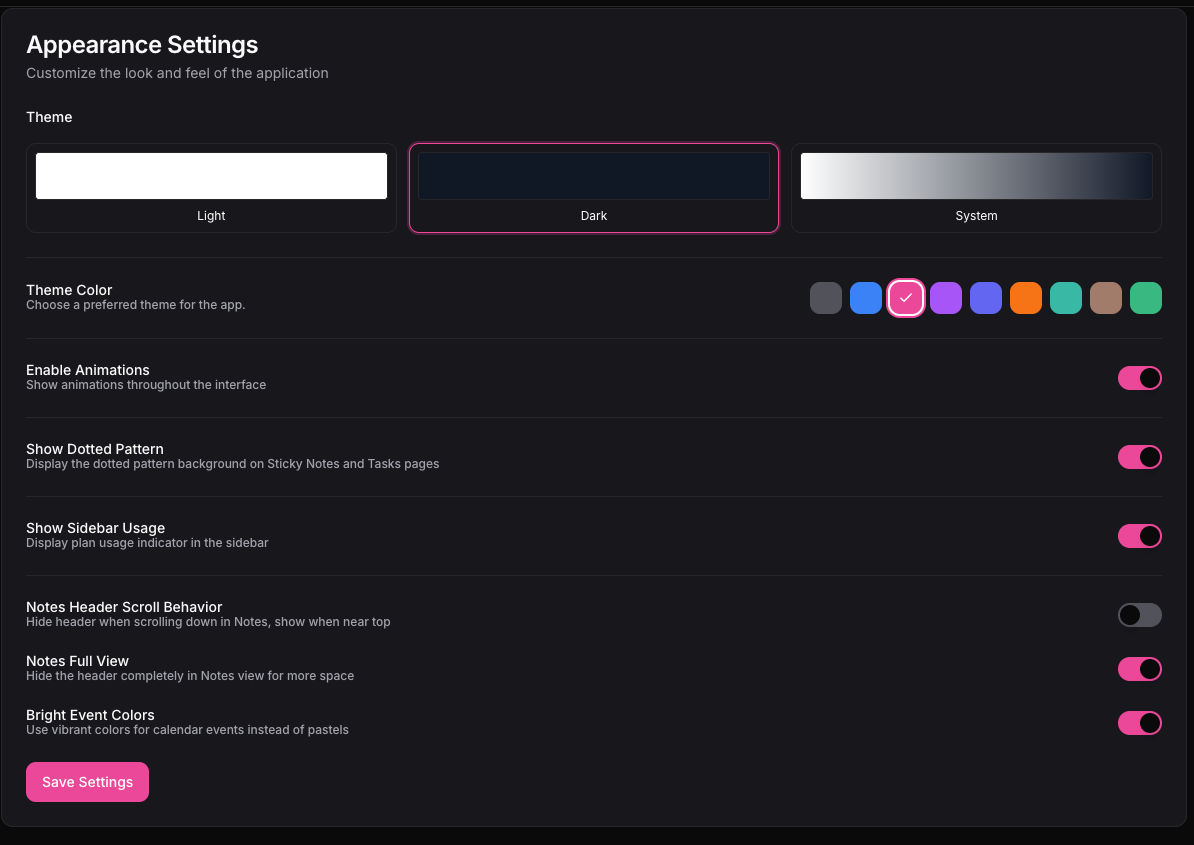
🎨 Smarter Theme Colors
We’ve simplified the appearance settings. When you choose a theme color, it now applies consistently across the app, including buttons and the sidebar. We also added a default option for users who prefer sticking with just light or dark mode.
🧩 Cleaner Appearance Settings
Unnecessary styling options have been removed to keep things simple and focused. The appearance section is now easier to understand and quicker to customize.
🗒️ Improved Sticky Notes Experience
We fixed an issue with the delete confirmation for sticky notes. If you choose “Don’t show this again,” the confirmation will now behave as expected when deleting other notes.
👥 Better Team Management Flow
We’ve improved the experience when removing team members so confirmations feel more consistent and aligned with the rest of the app.
⚡ Overall Polish & Stability
Small tweaks and refinements across the app to make interactions smoother and more predictable.
Recent Updates & Improvements
👤 Profile & Settings
- Avatar Removal Fix: Fixed an issue where deleting a profile picture would result in a blank/white screen. The user avatar now correctly reverts to initials immediately in both the Settings page and the Sidebar.
📝 Notes Editor
- Improved Scrolling ("Breathing Room"): Added significant empty space at the bottom of the editor (similar to Notion), allowing you to scroll comfortably past the last line of text.
- Selection Fix: Resolved a conflict where highlighting text would incorrectly trigger the "block selection" (blue box). Now, standard text selection works smoothly, and the blue block selection only appears when clicking and dragging on the background.
- Inline Code Support:
- Added a new Inline Code feature with a dedicated toolbar button < />.
- Styled to match Notion: gray background, red text, and rounded corners (no backticks).
- Updated the Code Block button to use a Terminal icon >_ for clear distinction.
New Features
- User mentions added
- Real-time team member removal support
- Mobile view support added
- Dark theme introduced
Improvements & Fixes
- Login and signup laptop view refined and stabilized
- Active session handling improved
- Session settings updated and fixed
- Authentication flow improvements
- Event updates and support email fixes
- Multiple bug fixes related to sessions and UI stability